PinterestConcept
Pinterest: control AI content in two taps, right from the feed
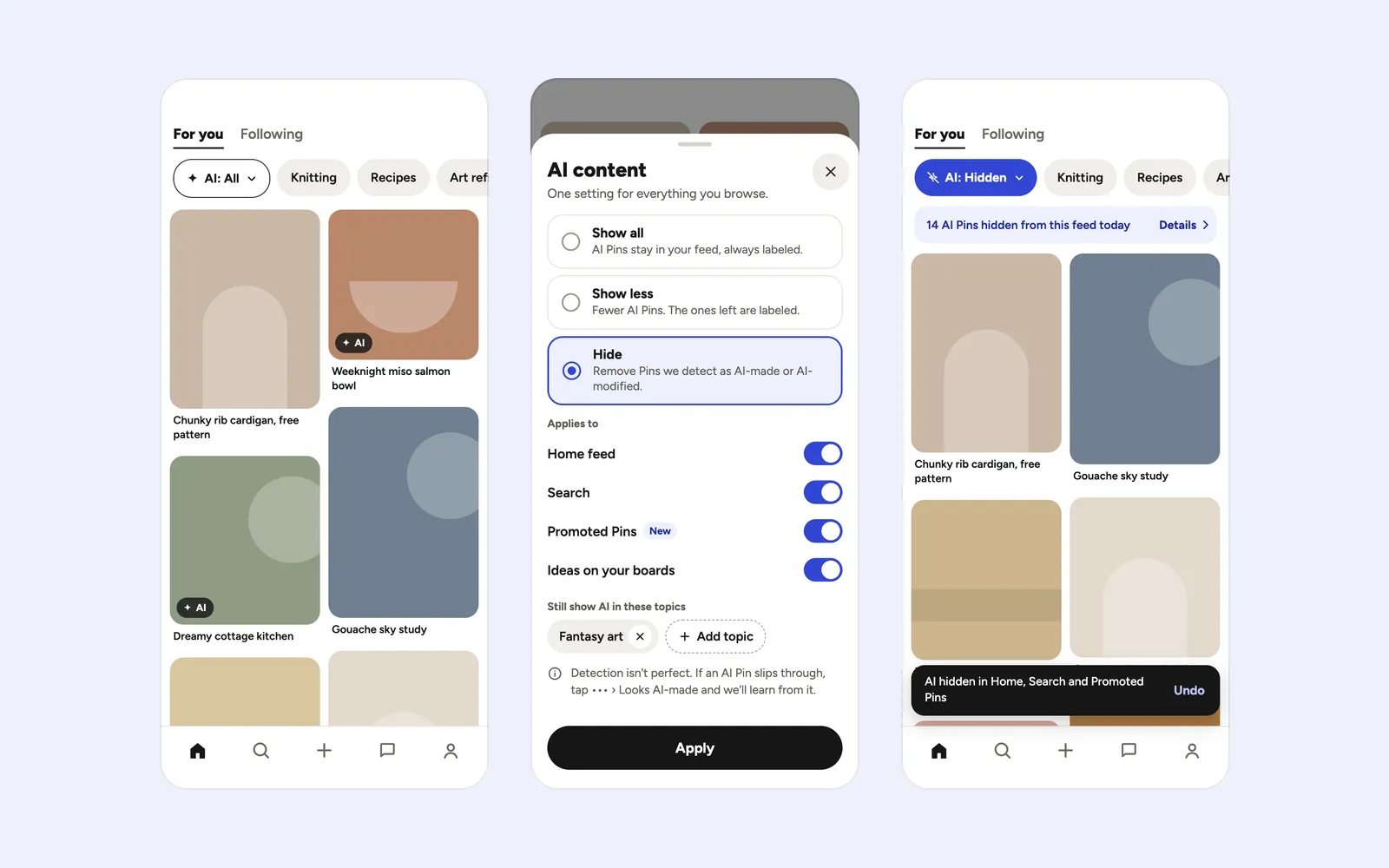
An “AI” chip in feed and search: one mode — All · Less · Hide — for everything, Promoted Pins included, with a visible effect: “N hidden”, Undo, a weekly report.
Concept, not affiliated with the company. Independent work based on public data and the public version of the product. Metrics are expected, not actual.
- Problem
- The AI tuner is buried in Settings, works per category and ignores ads: 47 of 63 reviews about it say “it’s on, but I still see AI”
- My role
- Analyzed reviews and press coverage, prioritized opportunities, designed the flow and 7 screens, built the clickable prototype
- Timeline & team
- 2026 · Solo
- Outcome
- Expected: more saves per impression among users who turn the control on. Validated by A/B: “chip in feed” vs. “setting”
Pinterest, feed and search · iOS / Android · Claude Design, Unstar
01 · Problem
The “less AI” tuner exists, but people can’t find it, it skips ads, and its effect is invisible
Pinterest runs on inspiration you can act on: a recipe, a pattern, a reference. In these niches an AI image is the worst kind of deception, and an AI product photo in a Promoted Pin leads to a sketchy store.
For users
- I turned on “less AI” — and AI is still in my feed and ads
- There’s no label in the grid; you only know a Pin is AI after opening it
- Hiding AI takes 5 steps and a toggle for every single category
For the business
- Churn to alternatives: people who leave name Cosmos and Are.na
- Low ratings: AI complaints average 1.14★
- Creators fight false labels through support, with a 24–48 hour response time
Why the current tuner fails
- It’s buried. Settings → Refine your recommendations — far from the feed, where the pain is.
- It works per category. There’s no global mode; each topic is switched on separately.
- It skips ads. The Help Center states outright that the setting doesn’t change ads in the feed.
- Its effect is invisible. No label in the grid, ad labels hidden in a menu, no counter.
02 · What I learned
People don’t notice labels and don’t trust the toggle
- Trustpilot and app store reviews
- Press coverage
- Help Center
- Nielsen heuristics
| Signal | Number | Source |
|---|---|---|
| Complaints about AI content in the review sample | 59 of 277, average rating 1.14★ | Fact (sample) |
| Reviews of the tuner saying “it’s on, but I still see AI” | 47 of 63 | Estimate · Unstar |
| AI-related reviews that mention labels | 5 of 465 | Estimate · Unstar |
| AI Pins among the top 12 for “healthy recipe ideas”, only one labeled | 6 of 12 | Fact · Futurism |
“Estimate” means the sample was tagged by a tool, not counted by hand; it’s worth re-checking on a larger sample.
Key insights
- Insight 1
The problem isn’t a missing setting — it’s distrust of the one that exists
«They need to add a feature to just opt out of it entirely.»
One mode for everything, plus visible proof that it works
- Insight 2
Ads are part of the same pain
«Absolutely flooded with AI slop and AI ads»
A control that skips Promoted Pins feels broken
- Insight 3
Labels exist, but nobody sees them
Only 5 of 465 AI-related reviews mention labels. The label belongs in the grid, not inside the Pin
03 · Options and decision
I picked O1: in-feed control buys the most trust for moderate effort
How might we
How might we let people control AI content in one tap wherever they see it — and show them the control actually works?
Choice and trade-off
I chose O1 “AI content control people can see and trust”, scored impact 4 / effort 3. It fixes three of the four reasons the tuner fails — placement, coverage and visible effect — and doesn’t need perfect detection: labeling errors are solved by correction, not classifier accuracy. O3 — letting creators dispute labels — is out of scope: only a bridge from the Pin screen made it in.
04 · Key decisions
Control moved from Settings into the feed: 2 taps instead of 5 steps
Decision 1
The “AI” chip comes first in the feed’s topic row
Control lives where the pain is, not in Settings. The AI badge shows right in the grid, on Promoted Pins too.
Decision 2
One mode out of three instead of per-category toggles
All · Less · Hide — with the scope spelled out, Promoted Pins included. Categories remain only as exceptions (“Still show AI in these topics”).
Decision 3
The effect is visible immediately
The chip changes state, a line reads “14 AI Pins hidden from this feed today”, and a toast offers Undo. The ad slot stays, only the creative changes — a hypothesis to validate with the Ads team.
Decision 4
The label explains its source, and mistakes are fixable
The label names its source — metadata, the creator’s own tag or a classifier. Viewers hide similar Pins; creators dispute the label in one tap.
All screens (7)
Entry points for people who miss the chip
- E · Search — the same mode, no extra setup; hidden results don’t vanish without a trace: “23 AI results hidden · Show”.
- F · Nudge — after two “See fewer” taps on AI Pins, a “Hide AI everywhere” card appears in the feed.
- G · Weekly report — how much was hidden and where, plus the question “Does your feed feel real?”.
05 · Results
Success isn’t “found the setting” — it’s a feed people trust again
This is a concept: below is a measurement plan, not results.
| Metric | Why | Expected |
|---|---|---|
| Feed saves per impression among users with the control on | Primary: trust in the feed turns into action | Up vs. control |
| Share who find the control within 7 days | Does the chip work as an entry point | Up |
| Share of AI Pins in impressions after turning it on | Does the mode work technically | Down |
| “My feed feels real”, 1–5 | Direct in-app question | Up |
| Weekly return of the cohort with the control on | Retention | Up |
Guardrails and risks
Guardrails: ad revenue and ad impressions per session, outbound clicks, creator appeals against false labels, Pinner Wait Time on closeup, share who turn the control back off.
Risks → design response:
- False labels hurt creators → one-tap “Dispute label”.
- Conflict with ad revenue → the slot stays, the creative changes (hypothesis).
- Hide empties niche topics → Show less by default, plus per-topic exceptions.
Validation plan
- In-depth interviews (12) and an in-app survey (400+) — how people tell AI from real, and how widespread the pain is
- Usability tests of the current tuner and the prototype (5–8 each) — do they find the chip, do they understand its scope
- Diary study (10–15, 2 wks) — perceived share of AI before and after
- A/B test (2–4 wks) — “chip in feed” vs. “setting”, with guardrails