UralsibConcept
Uralsib Online: one-gesture sign-in and access recovery without a call
“Trusted device”: one gesture on a familiar phone, a password only on a new one and with a reason, recovery via SMS plus passport or card.
Concept, not affiliated with the company. Independent work based on public data and the public version of the product. Metrics are expected, not actual.
- Problem
- The app asks for a password despite fingerprint sign-in; on a new phone without a card, access returns only via a call or a branch
- My role
- Test task and 4 scenarios, every screen run through “pain → solution → principle → heuristic”, wireframes, hi-fi, prototype
- Timeline & team
- 2026 · Solo
- Outcome
- Measurement plan: test task in 5 min without a call, recoveries without support; guardrail — account takeover attempts
Uralsib Online · Android + web version on iPhone · Claude Design
01 · Problem
Every sign-in step adds friction, and every error ends in a phone call
Usability test task
Andrey bought a Redmi Note 13. He doesn't remember his password and doesn't have his card on hand, but he has his passport. Sign in to the bank and make tomorrow's car loan payment — within 5 minutes, without calling.
For the business
- Every access recovery loads the call center and branches.
- A customer who can't sign in can't make a loan payment on time either.
- Simpler sign-in must not make account takeover easier.
Context
The “Trusted device” concept for hypothesis 1: sign-in and access recovery. The visual language is the “Uralsib · kit”, rebuilt from screenshots of the app in RuStore.
02 · What I learned
Customers get stuck on passwords, phone calls, and cryptic codes
- RuStore reviews
- Current sign-in audit
- Test task
- Nielsen heuristics
Key insights
- Insight 1
The app asks for a password even though the customer signs in with a fingerprint: one RuStore review cites 15 minutes to sign in. Biometrics fail with no explanation or fallback
One gesture on a familiar device, a password only where it's needed, and with an explanation
- Insight 2
There's no dedicated flow for a new phone, and without a card or account number the only way back is a call or a branch visit
Recover with what's always on hand: a passport or card, no account number needed
- Insight 3
Errors are bare codes with no reason given, e.g. “Error 1007: check your device for viruses”
An error is a reason plus a next step
03 · Options and decision
Trust the device instead of making people remember a password
V2 concept: “Trusted device”
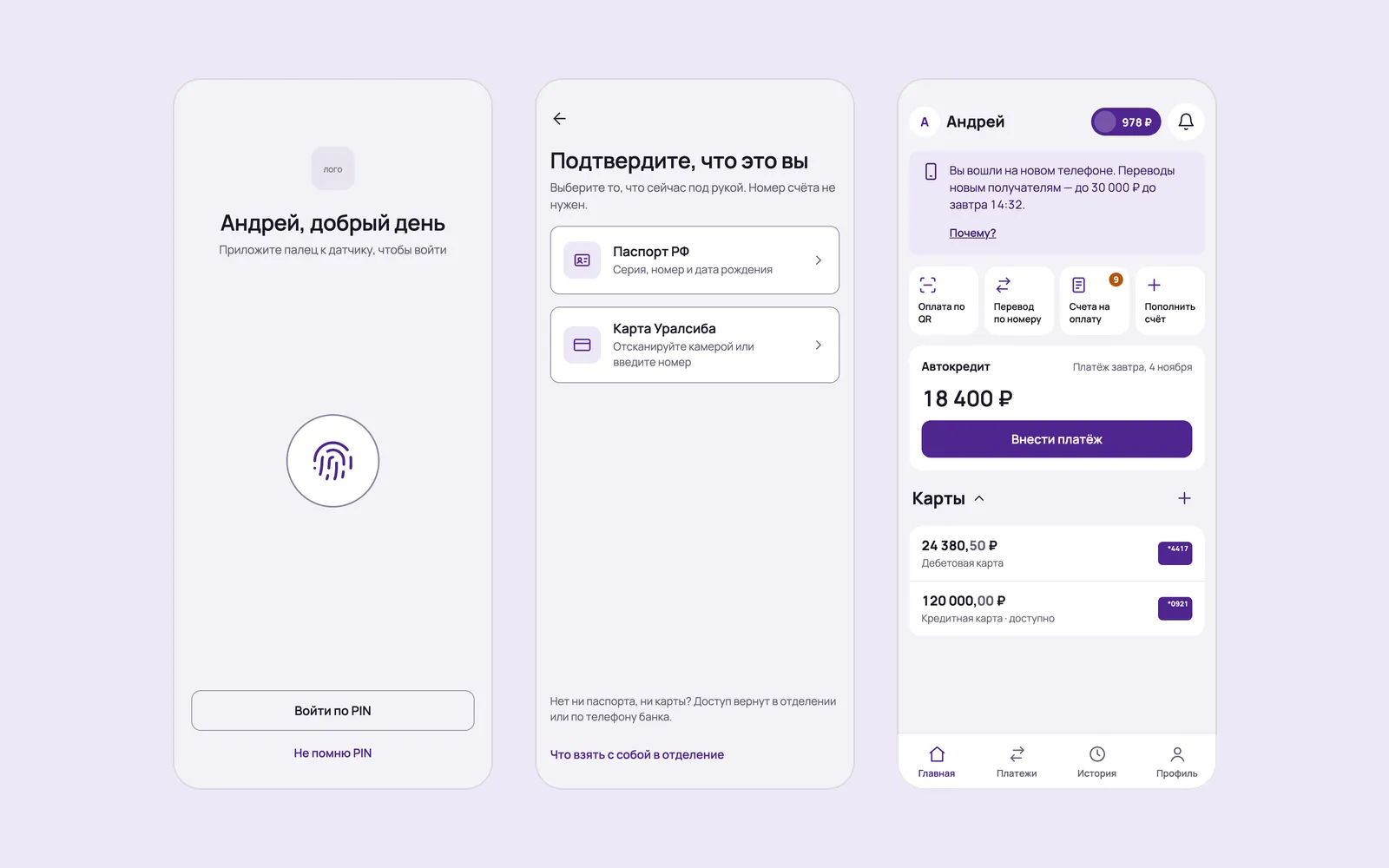
On a familiar phone, sign-in takes one gesture. A password is required only on a new device, and always with a reason. Access is restored via SMS plus passport or card, without calling the bank.
Seven principles I checked every screen against
- One gesture on a familiar device.
- A password only where it's needed, and with an explanation.
- Recover with what's always on hand: a passport or card.
- An error is a reason plus a next step.
- Self-service to the end — no calls, no branch visits.
- Customers see their devices and are notified of every new sign-in.
- Nothing extra.
The security trade-off
Simplicity comes paired with protection
Simpler sign-in can make account takeover easier. So it comes paired with protection: a notification of every new sign-in sent to the previous device, a device list, and a limit on transfers to new recipients during the first 24 hours on a new phone.
04 · Key decisions
Four scenarios cover everything from everyday sign-in to a bank-side outage
First, wireframes W1–W17, then hi-fi on the UI kit, a dark theme, and a clickable prototype. Every screen is annotated: current pain → solution → principle → Nielsen heuristic.
Decision 1
One gesture instead of a password
On a familiar phone we ask for a fingerprint right away; if it isn't recognized — straight to PIN, and after 5 wrong PINs — password sign-in, not a lockout. The password shows up no more than once every 90 days or on a risk signal, and always with a reason: “You haven't signed in for 3 months.”
Decision 2
New phone, forgotten password, no card — and still no call
Sign-in by phone number and SMS code, the reason for the password — “You're signing in from a new phone”, identity check with a passport or card. After sign-in we offer PIN and fingerprint right away, and the home screen shows a 24-hour limit banner with “Why?”: a payment on your own loan isn't subject to the limit.
Decision 3
Customers learn about every sign-in and manage their devices
“Is this you?” — a push and SMS to the previous phone with model, city, and time; “No” blocks the sign-in. In “My devices”, “Disconnect” takes one step: support used to advise checking your devices, but there was no tool for it.
Decision 4
A reason and a next step instead of a code
Instead of “Error 400: clear the cache” — “Something went wrong on our side, your money is safe” and what you can do right now. Instead of “Error 1007” — an explanation without blame and a simple step: update Android or sign in via the web version.
All screens (8)
D · Web version on iPhone
The same pattern where there's no app
Phone and password, plus an SMS hint for a new device. After sign-in — 3-step instructions for adding the bank to the Home Screen so it opens like an app. Names, amounts, and devices in the mockups are fictional.
05 · Results
Success means customers sign in and pay on their own without weakening security
Metrics and thresholds are my proposals for validation, not bank data.
| Metric | Why | Expected |
|---|---|---|
| Share completing the test task in 5 minutes without a call | A direct check of scenario B in usability testing | Most participants |
| Share of access recoveries without support or a branch visit | The primary product metric | Increase |
| Support requests on the topic of sign-in | Business impact | Decrease |
| Share of one-gesture sign-ins on a familiar device | Whether principle 1 works | Increase |
Guardrails: account takeover attempts and the rate of “No, it wasn't me”, fraudulent transfers from new devices, share of blocked sign-ins.